How to fill in an invoice
- Parties. Enter your business under From, including a Tax / registration ID if you have to show one, and the customer under Bill to. Open Ship to only when goods went to a different address.
- Number and dates. Keep the suggested number (INV-0001) or continue your own sequence, then set the invoice Date and the Due date. Add the customer’s Order / PO number under More options if they gave you one.
- Lines. Enter what you are billing with quantity and unit price; the amount is calculated. If you already have an estimate or work order, open it and choose Create invoice instead of retyping. Long item lists can come from a spreadsheet (CSV item import).
- Tax and extra columns. In the Totals box, type your Tax rate (%) and Tax name (Tax, Sales tax, VAT, GST). The rate starts at 0, and nothing is guessed from your location. In the editor, tick More columns above the lines to show Item code, Unit, Disc. % and Taxed; untick Taxed on lines that carry no tax.
- Payments. Add each payment you have received with its date, amount and method. The invoice prints Paid and Balance due.
- Download or print. Download the PDF or print it. If the page prints cut off or on the wrong paper, see Fix print cut-off.
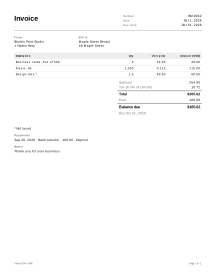
Example: an invoice with a deposit
Names and figures are invented.
Bluefin Print Studio bills Maple Street Dental. The tax rate is 6.5%; design time is not taxed in this example (set Taxed to match your own rules). The customer paid a 100.00 deposit when ordering.
| Description | Qty | Unit price | Taxed | Amount |
|---|---|---|---|---|
| Business cards, box of 500 | 2 | 24.95 | yes | 49.90 |
| Flyers, A5 | 1,000 | 0.115 | yes | 115.00 |
| Design time | 1.5 | 60.00 | no | 90.00 |
- Subtotal = 49.90 + 115.00 + 90.00 = 254.90.
- Tax (6.5%) on the taxed lines: (49.90 + 115.00) × 6.5% = 164.90 × 6.5% = 10.7185 → 10.72.
- Total = 254.90 + 10.72 = 265.62.
- Paid = 100.00, so Balance due = 265.62 − 100.00 = 165.62.
Amounts are rounded to the currency’s smallest unit (here the cent) on each line, half away from zero: an amount of 7.475 would become 7.48, not 7.47. Tax is rounded once for each tax rate, on the sum of the taxed lines at that rate, not line by line.
Invoices in practice
Partial payments and balance due
Record every payment on the invoice it belongs to, including deposits paid before the work started. Paid is the sum of the payments and Balance due is the total minus that sum, so the customer always sees what is still open. A refund can be entered as a negative payment. If the balance goes below zero, the customer has overpaid and Check before you send warns you.
The tax line is only what you type
The tool multiplies each taxed line by the rate you enter and prints the label you choose. It does not know which goods or services are taxable where you are, whether you must register for tax, or which details your tax authority requires on an invoice. Those rules differ by country, and often by state or province. Ask your tax authority or an accountant if you are unsure.
Not an e-invoice
A PDF from the invoice editor is a plain invoice document. It is not an e-invoice, and the tool does not check it against your country’s rules. Some countries require invoices between businesses to be sent in a structured electronic format, through an approved platform or from registered invoicing software.
Invoice or receipt
An invoice asks to be paid; a receipt confirms a payment. When an invoice is paid in full, its Balance due shows 0.00, which is a useful record, but a customer may still ask you for a separate receipt. Choose Record payment and create receipt on the invoice: the payment is added under Payments and a payment receipt opens with the invoice number, total and balance filled in.
Where invoices come from
On a service job, invoice from the work order so you bill the hours and parts actually used, or from an accepted estimate when the job went exactly as priced. Approved change orders are added with Add to invoice, and billable hours from a timesheet with Create invoice on the timesheet. See all service job documents.
Your data
Your invoices are never uploaded, and they are kept only if you choose to save them (how saving works).
Limits
- It does not send invoices, collect payments or connect to a bank or payment service.
- Some places require tax to be rounded on each line; the tool rounds it once per tax rate.
- There are no tax-inclusive prices, compound taxes or discounts on the whole invoice; discounts are per line.