How to fill in an estimate
- Parties. Enter your business under From and the client under Client. Open Job site only when the work happens at a different address.
- Number, dates and wording. Keep the suggested number (EST-0001) or type your own, check the date and set Valid until (it starts 30 days after the date; change it to the period you can hold your prices). Under Document wording, choose Estimate (approximate price) or Quote (fixed price offer); the printed heading follows your choice.
- Lines. Add a line for each piece of labor and each material, with quantity and unit price. The amount is calculated for you. To add many items at once, import them from a spreadsheet (CSV item import).
- Type, more columns and tax. In the editor, choose each line’s Type (labor, material or item). Tick More columns above the lines to show Item code, Unit, Disc. %, Taxed and Optional. In the Totals box, type your tax rate in Tax rate (%) and its name (Tax, VAT, GST) in Tax name. The rate starts at 0; nothing is filled in for you.
- Terms and notes. Under More options, add payment terms, what is not included and how the client can accept. An Accepted by line and a Date line are printed at the bottom for a handwritten signature.
- Download or print. Download the PDF or print it. If the page prints cut off, see Fix print cut-off.
Example: a water heater replacement
Names and figures are invented.
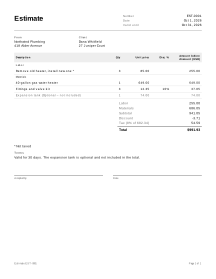
Northwind Plumbing prices a job for Dana Whitfield. The tax rate is 8% and, in this example, labor is not taxed. Whether labor is taxed where you work is a local rule: set Taxed to match it.
| Type | Description | Qty | Unit price | Disc. % | Taxed | Amount |
|---|---|---|---|---|---|---|
| Labor | Remove old heater, install new one | 3 | 85.00 | no | 255.00 | |
| Material | 40-gallon gas water heater | 1 | 649.00 | yes | 649.00 | |
| Material | Fittings and valve kit | 3 | 12.35 | 10 | yes | 37.05 |
| Material | Expansion tank (optional – not included) | 1 | 74.00 | yes | 74.00 |
How the totals come out:
- Subtotal = 255.00 + 649.00 + 37.05 = 941.05 (the optional tank is not counted until Include is ticked).
- Discount = 10% of 37.05 = 3.705, rounded to 3.71.
- Tax (8%) on the taxed amounts after discount: 649.00 + (37.05 − 3.71) = 649.00 + 33.34 = 682.34, and 682.34 × 8% = 54.5872 → 54.59.
- Total = 941.05 − 3.71 + 54.59 = 991.93. The labor and materials subtotals are 255.00 and 686.05.
- If the client takes the expansion tank and you tick Include, it adds 74.00 plus 5.92 tax, and the total becomes 1,071.85.
Each line is rounded to the currency’s smallest unit (here the cent), half away from zero (0.005 becomes 0.01), before lines are added up. Tax is worked out once for each tax rate, on the sum of the taxed lines at that rate, and rounded once, so it is exactly the rate × the taxed amount shown next to it.
Estimates in practice
Estimate or quote
The tool makes both from the same lines. The difference is in the wording and in what you promise: an estimate is usually an approximate price, a quote usually a fixed price for the work described. How binding either one is varies by country, by trade and by contract. Whatever you choose, write the scope clearly, list what is not included and set a Valid until date.
Optional items
Mark a line as Optional to offer extras without adding them to the total: a better part, a second coat of paint, an extended cleanup. Unselected optional lines print with Optional – not included and are left out of every total. When the client says yes, tick Include on that line and the totals update.
Revisions
When the client asks for changes after you sent the estimate, start a new revision instead of overwriting the old one. The document keeps its number and prints Revision 2, so both of you can tell which version was accepted. Keep the PDF of each version you sent.
From accepted estimate to work order and invoice
You do not need to retype anything. Create work order copies the client, job site and lines into a work order for the crew, where they record the hours and parts actually used. Create invoice copies them straight into an invoice when the job is done as quoted. Each new document records the estimate number under Based on; later edits to the estimate never change it. See all service job documents.
Your data
An estimate stays in the browser where you wrote it; to find it again later, turn on saving or keep a backup file (how saving works).
Limits
- It does not send the estimate or collect a signature online; the acceptance line is a printed line for a pen.
- It does not look up tax rates or decide what is taxable. The tax line is only the rate you type.
- It does not take deposits or payments.