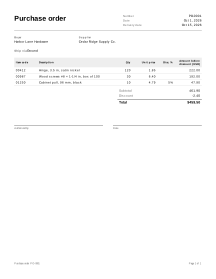
How to fill in a purchase order
- Parties. Enter your business under Buyer and the supplier under Supplier. Open Ship to when the goods should go to a different address, such as a warehouse or job site.
- Number and dates. Keep the suggested number (PO-0001) or continue your own, check the date and set the Delivery date you need. Ship via (for example ground or pickup) is under More options.
- Lines. For each item, enter the supplier’s Item code, a description, the quantity and the agreed unit price. Import a long list from a spreadsheet with the CSV item import.
- More columns and tax. Tick More columns to add Unit, Disc. % or Taxed. Tax rate (%), in the Totals box, starts at 0; type a rate only if you want tax shown on the order.
- Terms. Under More options, write payment terms, delivery instructions and anything the supplier must confirm. An Authorized by line and a Date line are printed for a signature.
- Download or print. Download the PDF for the supplier or print it. If the page prints cut off or on the wrong paper, see Fix print cut-off.
Example: restocking cabinet hardware
Names and figures are invented.
Harbor Lane Hardware orders from Cedar Ridge Supply Co. The supplier gives 5% off the cabinet pulls. No tax is shown on this order, so the rate stays at 0.
| Item code | Description | Qty | Unit price | Disc. % | Amount |
|---|---|---|---|---|---|
| 00412 | Hinge, 3.5 in, satin nickel | 120 | 1.85 | 222.00 | |
| 00987 | Wood screws #8 × 1-1/4 in, box of 100 | 30 | 6.40 | 192.00 | |
| 01250 | Cabinet pull, 96 mm, black | 10 | 4.79 | 5 | 47.90 |
- Subtotal = 222.00 + 192.00 + 47.90 = 461.90.
- Discount = 5% of 47.90 = 2.395, rounded half away from zero to 2.40.
- Tax = 0.00 (rate 0).
- Total = 461.90 − 2.40 = 459.50.
Each line’s amount and discount are rounded to the currency’s smallest unit before they are added up. Tax is rounded once for each tax rate, on the sum of the taxed lines at that rate.
Purchase orders in practice
PO or invoice
The purchase order comes first and comes from the buyer: it says what you want and at what price. The invoice comes later and comes from the seller: it says what you owe. Suppliers usually quote your PO number on their invoice and packing slip, so give every order a number and keep the PDF you sent.
Item codes keep their leading zeros
Supplier part numbers such as 00412 or 01250 are stored as text, exactly as you type or import them. Spreadsheets often drop the zeros when they read a code as a number. If your codes look wrong after an import, the zeros were probably lost in the spreadsheet before the file was saved; the CSV item import guide explains how to keep them.
When the delivery arrives
To check a delivery from your supplier line by line, open the order and choose Create goods received note: the goods received note records what arrived, what was damaged or refused and what is still outstanding. If an order arrives in several parts, choose Create next goods received note on the previous goods received note. See all purchasing documents.
If you are the supplier
Create packing slip is for the seller: see starting a packing slip from a PO.
Your data
Orders are never uploaded; to reopen one when the goods arrive, it has to be saved on this device or in a backup file (how saving works).
Limits
- It does not send the order to the supplier, track its status or connect to inventory or accounting software.
- It does not add legal purchase terms; write your own or use terms you already have.
- It does not look up tax rates; the tax line is only the rate you type.