How to fill in a payment receipt
- Start from the invoice. Open the invoice that was paid and choose Record payment and create receipt. A small panel asks for the date received, the amount (it starts at the balance due), the payment method and a reference. Choose Record payment and create receipt in the panel: the payment is added to the invoice’s Payments, and the receipt opens as a new document.
- Check what was copied. Received from starts as the invoice’s customer, your business details come from the invoice, and Invoice number, Invoice total and Previously paid are filled in from the invoice. Edit Received from if someone else paid, for example a parent company. Without a saved invoice: if you open the receipt editor directly instead, type Invoice number, Invoice total and Previously paid yourself (copy them from your invoice); Check before you send warns while they are blank.
- Receipt number and dates. Type a Receipt number from your own sequence (for example RCT-0001). Receipt date is the day you write the receipt; Date received is the day the money arrived.
- Method and reference. Payment method is free text (Bank transfer, Card, Cash, Check). Put the bank reference or check number under Reference so the customer can match it to their records.
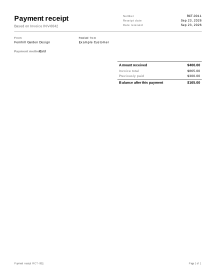
- Review. The receipt shows Amount received and Balance after this payment. Check before you send lists problems such as a missing amount or an amount larger than the balance.
- Download or print. Download the PDF for the customer or print it.
Example: a deposit and a second payment
Names and figures are invented.
Fernhill Garden Design sent invoice INV-0042 for 865.00 to a customer, who paid a deposit, then a second part, and still owes the rest.
| Receipt | Date received | Method | Invoice total | Previously paid | Amount received | Balance after |
|---|---|---|---|---|---|---|
| RCT-0007 | 2026-09-02 | Bank transfer | 865.00 | 0.00 | 300.00 | 565.00 |
| RCT-0011 | 2026-09-23 | Card | 865.00 | 300.00 | 400.00 | 165.00 |
- RCT-0007: 865.00 − 0.00 − 300.00 = 565.00 still due.
- RCT-0011: 865.00 − 300.00 − 400.00 = 165.00 still due.
Previously paid counts only the payments recorded on the invoice before this one, so each receipt shows the balance as it was on that day. When the customer pays the last 165.00, the third receipt shows a balance of 0.00.
Receipts in practice
A record of money received, not a tax receipt
This receipt confirms that you received a payment against one of your invoices. It is a payment confirmation, not a tax receipt. In some countries a sale needs a receipt with set contents, in a set format or from approved software; check your local rules.
One receipt per payment
Make a new receipt each time money arrives. A deposit, a stage payment and a final payment each get their own receipt and their own number. The balance on each receipt is calculated from the invoice: Balance after this payment = Invoice total − Previously paid − Amount received.
The receipt keeps its figures
The invoice total and the earlier payments are copied into the receipt when you make it from the invoice. If you edit the invoice later, receipts you already made keep the figures they were issued with, just as a printed receipt would. If an invoice changes after a payment, make a new receipt for the next payment rather than changing an old one.
Same currency as the invoice
The receipt uses the invoice’s currency. A payment in another currency cannot be recorded against it here; Check before you send reports it as an error. Record the amount that was credited in the invoice currency instead.
Overpayments
If the amount received is more than what was still due, the balance after this payment is negative and Check before you send warns you. Agree with the customer whether you refund the difference or keep it as a credit; a refund can be entered on the invoice as a negative payment.
Part of the job chain
On a service job the documents follow each other: estimate, work order, change orders if the work changed, invoice, and a receipt for each payment. See all service job documents.
Your data
Receipts are never uploaded; the PDF you send is the customer’s copy, and saving your own copy is optional (how saving works).
Limits
- It does not collect payments or connect to a bank, card terminal or payment service.