How to make a statement of account
- Choose the customer. Pick a name from Customer: the list holds the customer names on invoices and receipts saved on this device (saving must be on; the editor says so at the top when it is off). Invoices with that customer name (capitals and extra spaces ignored) are included, with their payments, the receipts made for them, and receipts to that name not linked to an invoice (payments on account). The Bill to block is filled from the customer’s newest saved invoice; correct it if the address changed. To choose by hand instead, use Select invoices and tick invoices and on-account receipts.
- Set the period. From and To frame the lines on the statement. A new statement covers the previous calendar month (on 1 October: 1 to 30 September); leave From empty to start from the first invoice. Statement date is the date the aging is calculated on (the invoices and payments of the period, aged to that date); it starts at the end of the period and follows To until you change it. When the customer has no invoices or payments in the period, the editor says so.
- Number and date. Type a Number if you number your statements (for example ST-0001) and check the Date, the day you send it.
- Check the lines. Each invoice is a charge on its invoice date; each payment is a credit on the day it was received. Lines are sorted by date, invoices before payments on the same day, with a Balance after each line. The Opening balance sums everything before the period; the Closing balance is what is owed at its end.
- Check the aging. Under the lines, Open invoices on the statement date lists each open invoice with its Due date, Open amount, Days overdue and aging Column, and the Totals split the balance into Current, 1–30, 31–60, 61–90 and Over 90 days. Payments not linked to an invoice appear as Credit.
- Review. Check before you send lists invoices or payments without a valid date (left out), amounts it cannot read, overpaid invoices, receipts that match no payment on their invoice, and a statement date before the end of the period.
- Print or download. Download the PDF or print it. The PDF is the copy you keep of what you sent. If you open a saved statement later, it is recalculated from the invoices and receipts saved now, and the page says so.
Example: a monthly statement
Names and figures are invented.
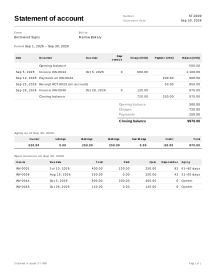
Birchwood Signs, a sign maker, sends its customer Marlow Bakery a statement for September 2026. All amounts are in USD. Saved on the device:
| Document | Date | Due date | Amount | Notes |
|---|---|---|---|---|
| INV-0031 | 2026-06-10 | 2026-07-10 | 400.00 | Payment of 150.00 recorded on 2026-07-05; receipt RCT-0020 made from that payment |
| INV-0038 | 2026-07-20 | 2026-08-19 | 250.00 | Not paid |
| INV-0044 | 2026-09-05 | 2026-10-05 | 600.00 | Payment of 200.00 recorded on 2026-09-12; receipt RCT-0027 for 200.00 received 2026-09-12 |
| RCT-0029 | 2026-09-25 | 50.00 | Payment on account, not linked to an invoice | |
| INV-0046 | 2026-09-28 | 2026-10-28 | 120.00 | Not paid |
Period 2026-09-01 to 2026-09-30, statement date 2026-09-30.
Opening balance (everything before 1 September): 400.00 − 150.00 + 250.00 = 500.00. RCT-0020 is not counted: it confirms the 150.00 payment already on INV-0031.
| Date | Document | Charge | Payment | Balance |
|---|---|---|---|---|
| Opening balance | 500.00 | |||
| 2026-09-05 | Invoice INV-0044 | 600.00 | 1,100.00 | |
| 2026-09-12 | Payment on INV-0044 | 200.00 | 900.00 | |
| 2026-09-25 | Receipt RCT-0029 (on account) | 50.00 | 850.00 | |
| 2026-09-28 | Invoice INV-0046 | 120.00 | 970.00 | |
| Closing balance | 720.00 | 250.00 | 970.00 |
- RCT-0027 has the same date and amount as the payment on INV-0044, so it is the same money and is listed once.
- Closing = opening + charges − payments: 500.00 + 720.00 − 250.00 = 970.00, the same as the last running balance.
Aging as of 2026-09-30
| Invoice | Due date | Total | Paid | Open | Days overdue | Column |
|---|---|---|---|---|---|---|
| INV-0031 | 2026-07-10 | 400.00 | 150.00 | 250.00 | 82 | 61–90 |
| INV-0038 | 2026-08-19 | 250.00 | 0.00 | 250.00 | 42 | 31–60 |
| INV-0044 | 2026-10-05 | 600.00 | 200.00 | 400.00 | 0 | Current |
| INV-0046 | 2026-10-28 | 120.00 | 0.00 | 120.00 | 0 | Current |
| Current | 1–30 | 31–60 | 61–90 | Over 90 | Credit | Total |
|---|---|---|---|---|---|---|
| 520.00 | 0.00 | 250.00 | 250.00 | 0.00 | −50.00 | 970.00 |
- Days overdue: 10 July to 30 September is 21 + 31 + 30 = 82 days; 19 August to 30 September is 12 + 30 = 42 days. INV-0044 and INV-0046 are not due yet.
- Current = 400.00 + 120.00 = 520.00. The 50.00 on account is not linked to an invoice, so it is shown as a Credit of −50.00.
- Total = 520.00 + 250.00 + 250.00 − 50.00 = 970.00, equal to the closing balance.
Statements in practice
Built from your own records
The statement uses the invoices and payment receipts saved on this device. Fix a wrong amount or date on the invoice or receipt itself, then make the statement again. Its figures are only as complete as what was saved: a payment you never recorded is not on it.
Payments are counted once
When you record a payment on an invoice and make a payment receipt from it, both describe the same money. The statement takes the payment from the invoice and leaves out the receipt. A receipt linked to an invoice without a matching payment is counted as a payment on that invoice, and Check before you send asks you to check it.
Opening and closing balance
The opening balance is everything invoiced minus everything paid before the period starts. Lines dated after the end of the period are not on the statement. Closing balance = opening + charges − payments in the period. A negative closing balance means the customer has paid more than was invoiced.
Aging
Aging shows how old the unpaid amounts are, counted from each invoice’s due date. Invoices without a due date are counted from their invoice date. An invoice that is overpaid, and money received without an invoice link, go to the Credit column, so the columns always add up to the balance on the statement date.
Not a ledger, not a demand letter
A statement is a reminder of open items. It does not post anything to an accounting system, it is not a tax document, and it is not a formal demand for payment. It does not add interest, late fees or collection costs; whether these can be charged depends on your contract and local law; if you charge them, invoice them. See all service job documents.
Your data
Nothing is uploaded: the statement is read from invoices and receipts saved in this browser, so without saved invoices there is nothing to build it from (how saving works).
Limits
- It does not connect to a bank.
- It does not send email; download the PDF and send it yourself.