How to fill in an expense report
- Whose report. Enter the name under Person and, if you want, the period under Period from and Period to. Set the Default currency that new lines start with. To print a heading such as the trip or the month instead of “Expense Report”, open More options and type it under Heading on the document.
- One line per expense. Choose + Add expense and enter the Date, a Category (Travel, Meals, Lodging, Supplies or your own words), the Merchant and a short Description. A column you do not see is under More columns above the lines in the editor.
- Amount and currency. Type the Amount as paid, tax included, and choose the Currency you paid it in from the list on the line when it differs from the default.
- Tax (optional). If the receipt shows tax and you want it on record, tick More columns and type it under Tax. It is not calculated or added to the amount.
- Payment and reimbursable. Payment method is free text (Cash, Own card, Company card). Lines are Reimbursable unless you untick it for expenses the company paid directly.
- Receipt reference. With More columns ticked, type the receipt number or the name of your receipt file under Receipt ref. The file itself is not added to the report.
- Check the totals. The report shows, for each currency, the total, the reimbursable and non-reimbursable parts and the typed tax, plus totals per category.
- Print or download. Print it or download the PDF to hand in.
Example: a trip in three currencies
Names and figures are invented.
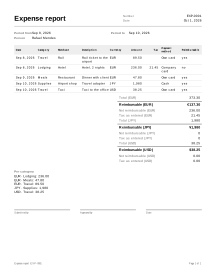
Rafael Mendes, a consultant, reports a client trip with a stop in Tokyo. The hotel was paid with the company card; everything else with his own money.
| Date | Category | Merchant / description | Currency | Amount | Tax | Payment method | Reimbursable |
|---|---|---|---|---|---|---|---|
| 2026-09-08 | Travel | Rail ticket to the airport | EUR | 89.50 | Own card | yes | |
| 2026-09-08 | Lodging | Hotel, 2 nights | EUR | 236.00 | 21.45 | Company card | no |
| 2026-09-09 | Meals | Dinner with client | EUR | 47.80 | Own card | yes | |
| 2026-09-10 | Supplies | Travel adapter, airport shop | JPY | 1,980 | Cash | yes | |
| 2026-09-10 | Travel | Taxi to the office | USD | 38.25 | Own card | yes |
Totals per currency (nothing is converted):
| Currency | Total | Reimbursable | Not reimbursable | Tax as entered |
|---|---|---|---|---|
| EUR | 373.30 | 137.30 | 236.00 | 21.45 |
| JPY | 1,980 | 1,980 | 0 | 0 |
| USD | 38.25 | 38.25 | 0.00 | 0.00 |
- EUR total: 89.50 + 236.00 + 47.80 = 373.30. Reimbursable: 89.50 + 47.80 = 137.30. Not reimbursable: the hotel, 236.00.
- JPY has no decimals, so the adapter is 1,980, not 1,980.00.
- Per category: EUR Lodging 236.00, Meals 47.80, Travel 89.50; JPY Supplies 1,980; USD Travel 38.25. The two Travel lines stay apart because they are in different currencies.
Rafael is owed 137.30 EUR, 1,980 JPY and 38.25 USD. How and at what rate that is paid back is up to his client or employer.
Expense reports in practice
Totals per currency, no conversion
Every line keeps the currency it was paid in, and the report adds up each currency on its own. No exchange rate is fetched or applied, because the rate that matters is the one your bank or card actually used, and the one your employer accepts. Each amount is rounded to its currency’s smallest unit (cents, or whole yen) before it is added. If you type more decimals than the currency has, Check before you send warns you. If whoever pays you back wants one total, ask which exchange rate they use (for example the rate on your card statement) and convert outside this tool.
Reimbursable or company-paid
Mark lines paid with your own money as Reimbursable; untick it for lines the company paid directly. The report shows both parts for each currency, so the person who checks it sees the whole trip and what is owed back. Advances and the rules on when expenses must be reported or paid back are set by your employer’s or client’s policy.
Tax is only what the receipt shows
The Tax column holds a number you copy from the receipt. It is part of the amount and is never calculated. Whether an expense is deductible or taxable depends on your country and your employer’s policy; ask your tax authority or an accountant.
Checks before you send it
- A line outside the period you set, a missing amount and a typed tax larger than the amount are warnings.
- A missing or invalid date, a blank or malformed currency code and an amount that is not a number are errors.
- A currency code in an imported file that is well formed (three letters) but not in the list is accepted with a warning and treated as having two decimals.
Receipts stay with you
The report records a reference to each receipt, not the receipt itself. Keep the original receipts as your employer or tax rules require. To confirm a payment you received from a customer, use the payment receipt instead.
Your data
Your expenses are never uploaded; a report you add to over a trip needs saving turned on (how saving works).
Limits
- It does not attach or store receipt images.
- It does not calculate mileage or per-diem rates.
- It does not submit the report or pay anyone back.