How to fill in a cash count sheet
- Count details. Type a Number if you number your counts, check the Date, enter who counted under Counted by, and give the drawer a Name (“Till 1”, “Front desk”). Choose the Currency; the coins and notes for it are listed. Changing the currency of a drawer that already has counts asks first, and switching clears the counts (the coins and notes of one currency do not exist in another).
- Count each denomination. Type the number of coins or notes next to each value. A blank counts as nothing counted. Counts are whole numbers; Check before you send flags decimals, negative counts and text it cannot read. Each line shows its Amount (value × count), and Coins, Notes and Counted total add up as you type.
- Rolls and missing values. For USD and CAD, tick Show coin rolls to count full bank rolls. Choose + Add denomination for a coin or note that is not listed; it is placed among the coins, notes or rolls by value.
- Expected cash (optional). Type what should be in the drawer under Expected, for example the opening float plus the cash sales from your register or sales record. The sheet shows Over/short and Balanced, Over or Short. Leave it empty to count without comparing. Amounts are typed to the currency’s smallest unit (the cent for USD); more decimals are an error.
- Float and deposit. Type the change to leave for the next shift under Float to keep. Deposit is what is left to take to the bank or the safe.
- More drawers. Choose + Add drawer to count another drawer. Each drawer keeps its own Counted total; the summary adds the drawers up per currency and shows their sum as Counted.
- Print or download. Print it or download the PDF to sign and keep with the cash.
Example: closing two registers
Names and figures are invented.
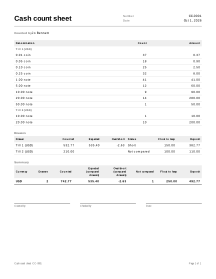
Pebble Lane Deli counts two registers in USD at closing time.
Till 1
| Denomination | Count | Amount |
|---|---|---|
| 0.01 coin | 37 | 0.37 |
| 0.05 coin | 18 | 0.90 |
| 0.10 coin | 25 | 2.50 |
| 0.25 coin | 32 | 8.00 |
| 1.00 note | 41 | 41.00 |
| 5.00 note | 12 | 60.00 |
| 10.00 note | 9 | 90.00 |
| 20.00 note | 14 | 280.00 |
| 50.00 note | 1 | 50.00 |
- Coins: 0.37 + 0.90 + 2.50 + 8.00 = 11.77.
- Notes: 41.00 + 60.00 + 90.00 + 280.00 + 50.00 = 521.00.
- Counted total: 11.77 + 521.00 = 532.77.
- Expected: Till 1 started with a 150.00 float and the sales record shows 385.40 in cash sales, so 150.00 + 385.40 = 535.40 is typed.
- Over/short: 532.77 − 535.40 = −2.63, Short.
- Deposit with a float to keep of 150.00: 532.77 − 150.00 = 382.77.
Till 2 was counted at 210.00 with a float to keep of 100.00 and no expected amount, so it shows Not compared and a deposit of 210.00 − 100.00 = 110.00.
Summary (USD)
| Drawers | Counted | Expected | Over/short | Not compared | Float to keep | Deposit |
|---|---|---|---|---|---|---|
| 2 | 742.77 | 535.40 | −2.63 | 1 | 250.00 | 492.77 |
532.77 + 210.00 = 742.77 counted; 150.00 + 100.00 = 250.00 float; 382.77 + 110.00 = 492.77 deposit. Expected and over/short only include Till 1, because Till 2 had no expected amount.
Cash counts in practice
Expected cash comes from your own records
The sheet does not know your sales. Expected is what you type: usually the opening float plus cash taken in, less any cash paid out of the drawer. Take the cash sales figure from your register or sales record before you count, and write down how you arrived at it under Notes.
Over or short
The difference is calculated to the currency’s smallest unit: 532.77 counted against 535.40 expected is 2.63 short. A small difference is often a miscount or wrong change; count again before you record it. If you count without an expected amount, the drawer shows Not compared and is left out of the over/short in the summary. When no drawer of a currency has an expected amount, the summary shows Not compared for that currency’s expected and over/short.
Float and deposit
Float to keep is the change for the next shift, and Deposit = counted − float to keep. An empty float counts as 0, so the whole drawer becomes the deposit. If the float is more than the drawer holds, the deposit is negative and Check before you send warns you.
Several drawers and currencies
Each drawer has one currency. The summary adds drawers of the same currency together and lists each currency separately; nothing is converted. For a currency without preset coins and notes, add them with + Add denomination.
Not a fiscal record
This sheet is a counting aid, not a register report or cash book. Rules on cash records differ by country; check your local requirements. For money received from a customer against an invoice, use a payment receipt. For counting stock rather than cash, see the inventory count sheet.
Your data
Cash counts are never uploaded; the signed PDF is the record to keep with the cash (how saving works).
Limits
- It does not connect to a register, POS system, card terminal or bank, and does not know your sales.