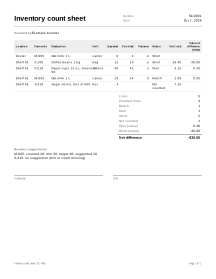
How to fill in an inventory count sheet
- Count details. Enter the count Date, who counted under Counted by, and the Currency for unit costs. To print a heading such as “Store room, September” instead of the standard one, open More options and type it under Heading on the document.
- Item lines. Choose + Add item line for each item and each place it is kept, and enter the Item code, a description, the Location (shelf, bin, cooler, back room) and the Unit. Item codes are kept as text, so 00123 keeps its zeros. A column you do not see is under More columns above the lines in the editor.
- Expected quantities. Enter the quantity your records say should be there under Expected. A blank counts as 0.
- Print in walking order. Sort by location puts the lines in the order you walk through the store: by location, then item code, with “A2” before “A10”. Lines without a location or item code go last. Print the sheet or download the PDF for the counters. For a blind count, first tick Blind count (print without expected quantities) under More options: the printed sheet then leaves out Expected and Variance.
- Enter the counts. Type what was counted under Counted. Leave it empty for lines not counted yet; enter 0 when the shelf was empty.
- Unit cost (optional). In the editor, tick More columns above the lines to show Unit cost and Value of difference, and enter a unit cost where you want the value of the difference. Lines without a cost show quantities only.
- Review the differences. Each line shows Variance and a status: Match, Over, Short or Not counted. The totals show how many lines are in each status and the value of the differences.
- Reorder levels (optional). With More columns ticked, add a Min and Target for items you restock; items below the minimum get a suggested quantity under Reorder suggestions.
Example: a café store room
Names and figures are invented.
Juniper Street Café counts its store room and cooler. The sheet is sorted by location, then item code.
| Location | Item code | Description | Unit | Expected | Counted | Variance | Status | Unit cost | Value of difference |
|---|---|---|---|---|---|---|---|---|---|
| Cooler | M-005 | Oat milk 1 L | carton | 6 | 4 | −2 | Short | ||
| Shelf A1 | C-100 | Coffee beans 1 kg | bag | 12 | 10 | −2 | Short | 18.40 | −36.80 |
| Shelf A1 | C-210 | Paper cups 12 oz, sleeve of 50 | sleeve | 40 | 42 | 2 | Over | 3.15 | 6.30 |
| Shelf A2 | M-005 | Oat milk 1 L | carton | 24 | 24 | 0 | Match | 2.09 | 0.00 |
| Shelf A2 | S-310 | Sugar sticks, box of 500 | box | 3 | Not counted | 7.25 |
- Variances: 4 − 6 = −2; 10 − 12 = −2; 42 − 40 = 2; 24 − 24 = 0. The sugar sticks were not counted, so they have no variance.
- Value of difference: −2 × 18.40 = −36.80; 2 × 3.15 = 6.30; 0 × 2.09 = 0.00. The oat milk in the cooler has no unit cost on that line, so it has no value.
- Totals: 5 lines, 4 counted: 1 match, 1 over, 2 short, 1 not counted. Net difference: 6.30 − 36.80 = −30.50 (Over (value) 6.30, Short (value) −36.80).
Reorder levels
| Item code | Min | Target | Counted (all locations) | Suggested |
|---|---|---|---|---|
| M-005 | 30 | 48 | 4 + 24 = 28 | 48 − 28 = 20 |
| C-100 | 6 | 15 | 10 | none (10 is not below 6) |
| S-310 | 2 | 4 | not counted | skipped, listed for checking |
Stock counts in practice
Variance, line by line
The variance is always counted − expected, so the sign tells you the direction: negative is missing stock, positive is stock you did not expect. A blank expected quantity counts as 0, which makes the whole counted quantity a variance; fill in the expected column before you read the totals.
Not counted is not zero
An empty Counted field means “not counted yet”. Such lines are listed as Not counted and are left out of the variance totals and the value of the differences. That keeps a count that is still in progress from showing a large loss. Enter 0 when you looked and the shelf was empty.
Value of the difference
With a unit cost, each counted line shows variance × unit cost, rounded to the currency’s smallest unit (half away from zero), and the totals add up the rounded line values, split into over and short. It is an estimate of what the difference is worth at the cost you typed. It is not a stock valuation for tax or accounts; valuation methods are an accounting and tax matter and differ by country.
Duplicates are flagged, never merged
The same item code in the same location twice (ignoring capitals and extra spaces) is flagged on both lines. The tool does not add them together, because it cannot know whether two people counted the same shelf or someone typed a line twice. One item in several locations is normal: each location gets its own line.
Reorder suggestions
The reorder rule adds up the counted quantity of an item over all locations. Only when that is below Min does it suggest Target − counted (never below 0). Items with a missing or invalid level, or with no counted line, are skipped and listed so you can check them. A target below the minimum is pointed out but used as typed. It is a simple rule, not a forecast. Order the suggested quantities with a purchase order, and check deliveries with a goods received note. See all purchasing documents.
Your data
A stock count is never uploaded; keep the PDF, or save the count on this device, if you need it after the tab is closed (how saving works).
Limits
- It does not connect to a point-of-sale, inventory or accounting system, or update stock levels anywhere.
- It does not scan barcodes.