How to fill in a return authorization
- Start from what was shipped. Open the packing slip or invoice for the goods coming back and choose Create return authorization. Each line with an item code or description becomes a line; prices are never copied. From and Customer are copied from the document, and from a packing slip so is the Order / PO number (the order number of the shipment). On an RMA made from an invoice, type the order number yourself if you want it on the form.
- Check the quantities. Shipped is everything shipped on the order up to that packing slip (Shipped before
- This shipment), or the quantity on the invoice. Previously returned comes from earlier return authorizations for the same order or invoice. Returnable is calculated. No saved packing slip or invoice? Open the return authorization editor directly and type Shipped and Previously returned for each line yourself.
- RMA number and date. The RMA number starts as RMA-0001; change it to your own sequence if you have one. On a second return for the same order, the next number is suggested. Check the Date.
- What comes back. For each returned line, enter Return now, choose a Reason (Damaged, Wrong item, Not needed, Defective, Other) and add detail under Reason details. Describe the goods under Condition (“unopened”, “box crushed”), and choose what the customer asks for under Requested: Replace, Repair, Refund request or Credit request. Lines you leave at 0 are not returned.
- Instructions. Under Return instructions, write how and where to send the goods, and ask the customer to put the RMA number on the parcel.
- Review. Check before you send lists errors (a return above the returnable quantity, negative quantities, numbers it cannot read) and warnings (a returned line without a reason, Other without details, nothing to return). An error is also shown right under its field. Totals count the lines returned; quantities are added up only per unit (when the lines have a Unit), never across different items.
- Print or download. Download the PDF for the customer or print it.
Example: two returns on one order
Names and figures are invented.
Cedar Ridge Supply Co. shipped order PO-0001 to Harbor Lane Hardware in two boxes, as in the packing slip example: 120 hinges, 30 boxes of screws and 4 cabinet pulls in the first, 3 more pulls in the second.
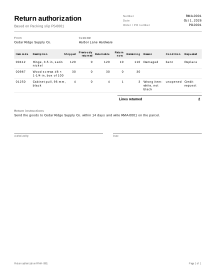
RMA-0001, made from the first packing slip: 10 hinges arrived bent, and 1 pull came in the wrong color.
| Item code | Description | Shipped | Previously returned | Returnable | Return now | Remaining | Reason | Requested |
|---|---|---|---|---|---|---|---|---|
| 00412 | Hinge, 3.5 in, satin nickel | 120 | 0 | 120 | 10 | 110 | Damaged | Replace |
| 00987 | Wood screws #8 × 1-1/4 in, box of 100 | 30 | 0 | 30 | 0 | 30 | ||
| 01250 | Cabinet pull, 96 mm, black | 4 | 0 | 4 | 1 | 3 | Wrong item: “white, not black” | Credit request |
- Shipped on the first slip = Shipped before + This shipment: 0 + 120 = 120; 0 + 30 = 30; 0 + 4 = 4.
- Returnable = Shipped − Previously returned: 120 − 0 = 120; 4 − 0 = 4.
- Remaining = Returnable − Return now: 120 − 10 = 110; 30 − 0 = 30; 4 − 1 = 3.
RMA-0002, made from the second packing slip a week later: 2 more pulls turn out to be defective.
| Item code | Description | Shipped | Previously returned | Returnable | Return now | Remaining | Reason | Requested |
|---|---|---|---|---|---|---|---|---|
| 01250 | Cabinet pull, 96 mm, black | 7 | 1 | 6 | 2 | 4 | Defective | Replace |
- Shipped = 4 shipped before + 3 in this shipment = 7.
- Previously returned = the 1 pull on RMA-0001. Both slips belong to order PO-0001, so the earlier return counts.
- Returnable = 7 − 1 = 6; Remaining = 6 − 2 = 4.
- Had someone typed 8 under Return now, Check before you send would report an error: 8 is more than the 6 that can still come back.
Returns in practice
Authorize against what was shipped
A return form typed from scratch accepts any quantity. Starting from the packing slip or invoice ties each line to what actually left the building, and earlier returns are subtracted. That catches the common mistakes: the same item authorized twice, or more units coming back than were sent.
Which returns count as “previously returned”
Earlier return authorizations count when they were made from the same document, or from another packing slip with the same order reference. Earlier returns are subtracted only when they were made from the same kind of document: a return made from the invoice does not see one made from a packing slip. Make every return for an order from its packing slips, or every one from its invoice, not a mix. Only return authorizations saved on this device are counted.
Reason and requested outcome
The reason (damaged, wrong item, not needed, defective, other) says why the goods come back. Requested records what the customer asks for. It is a request, not a promise: the form does not decide whether a refund or credit is due or how much it is.
No amounts on purpose
A return authorization has no price, refund or credit columns. The amount of a refund or credit depends on your terms, any restocking or shipping costs you agreed and, in some countries, consumer law. Record payments you refund on the invoice as a negative payment; a payment receipt confirms money received, not money paid back.
When the parcel arrives
Check the goods against the RMA number and the quantities on the form, and note what you find. See all shipping documents.
Your data
Returns are never uploaded; without earlier returns saved on this device, Previously returned starts at 0 (how saving works).
Limits
- It does not print shipping labels or arrange collection with a carrier.
- It does not update stock levels or connect to a store, inventory or accounting system.
- It does not record the inspection of returned goods; write what you find under Notes (in More options).