How to fill in a pick list
- List details. Type a Pick list number if you number your lists, check the Date, and enter who collects the goods under Picked by.
- Add the orders. Choose Add from packing slips to pick the packing slips saved on this device: each slip becomes one order, with the quantities under This shipment and the order number as Order reference. Lines with nothing to ship are left out. Or choose + Add order and type an Order reference, a Ship to name and the lines: Item code, Description, Unit and Qty. + Add line adds a line to the same order (it copies the Order reference and Ship to of the line above); + Add order starts a new, empty order.
- Add the locations. Under Locations, list where each item is kept: Item code and Location (“A2”, “Back room”, “Cooler”). Choose Use locations from an inventory count to take them from a saved inventory count sheet instead of typing them.
- Check the combined lines. Every item appears once per unit with its Total and a breakdown by order. The list is sorted in walking order: by location, then item code. Check before you send lists items without a location, items with several locations, the same item in different units, lines without an item code, missing order references, and quantities that are 0, negative or not a number. (Lines with the same order reference are one order.)
- Print and pick. Print or Download PDF gives the picker a sheet with an empty column for the picked quantity. The second part of the sheet, Pick to, lists what goes into each order’s box.
- Enter what was picked. Type the quantity under Picked, or tap Picked in full on a phone when the whole total was there. Status shows the difference (picked − total) and Picked, Short, Over or Not picked, for example “-1 Short”. On a phone, Go to picking at the top of the editor jumps to the combined lines, and each line shows its location and total in large type. With saving off, picked figures are lost if the page reloads.
Example: three orders, one walk
Names and figures are invented.
Kettle & Kiln Supply, a pottery supply shop, picks three online orders together.
The orders
| Order | Ship to | Item code | Description | Unit | Qty |
|---|---|---|---|---|---|
| 1041 | R. Okafor | T-100 | Mug blank, stoneware | pcs | 2 |
| 1041 | R. Okafor | G-210 | Glaze brush set | set | 1 |
| 1041 | R. Okafor | P-015 | Clay, 10 kg | bag | 1 |
| 1042 | Northfield Studio | P-015 | Clay, 10 kg | bag | 3 |
| 1042 | Northfield Studio | T-100 | Mug blank, stoneware | pcs | 6 |
| 1043 | M. Lindqvist | G-210 | Glaze brush set | set | 2 |
| 1043 | M. Lindqvist | T-100 | Mug blank, stoneware | box | 1 |
| 1043 | M. Lindqvist | K-007 | Kiln shelf, 30 cm | pcs | 1 |
| 1043 | M. Lindqvist | Gift wrap | sheet | 1 |
Locations: G-210 → A2, T-100 → A10, P-015 → B1. K-007 has no location.
The pick list (walking order)
| Location | Item | Unit | Total | By order | Picked | Status |
|---|---|---|---|---|---|---|
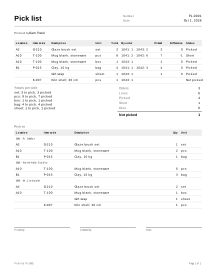
| A2 | G-210 · Glaze brush set | set | 3 | 1041: 1 · 1043: 2 | 3 | 0 Picked |
| A10 | T-100 · Mug blank, stoneware | pcs | 8 | 1041: 2 · 1042: 6 | 7 | -1 Short |
| A10 | T-100 · Mug blank, stoneware | box | 1 | 1043: 1 | 1 | 0 Picked |
| B1 | P-015 · Clay, 10 kg | bag | 4 | 1041: 1 · 1042: 3 | 4 | 0 Picked |
| Gift wrap | sheet | 1 | 1043: 1 | 1 | 0 Picked | |
| K-007 · Kiln shelf, 30 cm | pcs | 1 | 1043: 1 | Not picked |
- Totals: G-210 1 + 2 = 3; T-100 in pieces 2 + 6 = 8; P-015 1 + 3 = 4. The T-100 box stays on its own line: 8 pieces and 1 box are not 9 of anything.
- Order: A2 comes before A10 (numbers inside a location are compared as numbers), then B1. The two lines without a location go last; between them, “Gift wrap” (no item code, sorted by its description) comes before “K-007”.
- Picked: 7 − 8 = -1 for the mugs. 6 lines: 4 picked, 1 short, 1 not picked.
- Check before you send: T-100 is used with two units, K-007 has no location, and the gift wrap line has no item code.
Pick to (what goes into each order’s box, in the same walking order)
| Order | Ship to | Lines |
|---|---|---|
| 1041 | R. Okafor | G-210 × 1 set (A2) · T-100 × 2 pcs (A10) · P-015 × 1 bag (B1) |
| 1042 | Northfield Studio | T-100 × 6 pcs (A10) · P-015 × 3 bag (B1) |
| 1043 | M. Lindqvist | G-210 × 2 set (A2) · T-100 × 1 box (A10) · Gift wrap × 1 sheet · K-007 × 1 pcs |
The shares add up to the totals: 1 + 2 = 3 brush sets, 2 + 6 = 8 mugs in pieces, 1 + 3 = 4 bags of clay. One mug is missing, so one of the two orders that need loose mugs ships short.
Pick lists in practice
Same item, same line
Item codes are compared without regard to capitals or extra spaces, so “T-100” and “t-100 “ end up on one line, shown with the first spelling. Lines without an item code are combined only with other lines that have the same description and unit, never with coded lines; Check before you send asks you to add the code.
Units are never mixed
If one order asks for 6 pieces and another for 1 box of 6, the list does not know that a box holds 6. It keeps two lines and warns you. Decide whether to pick a box or loose pieces, and fix the unit on the order if it was a typing error.
Walking order
Sorting by location means one pass through the shelves instead of a trip per order. Location names are compared the way people read them: “A2” before “A10”, capitals ignored. Name your locations so that this order matches your floor (for example aisle, then shelf: “A-01”, “A-02”, “B-01”). Items without a location are printed last so the picker can look for them at the end.
One location per item
When the location list gives an item several locations, the pick list shows one and names the others, and Check before you send warns you. It never splits one line across several shelves.
Picked figures belong to the line
The picked quantity is stored with the combined line (item code + unit). If you change the item code or unit of an order line afterwards, that line’s picked figure is cleared, and Check before you send tells you.
From picking to packing
When the picking is done, each order gets its own packing slip. If something was short, ship what you have and leave the rest as remaining (Partial shipments). Returns of shipped goods are handled with a return authorization. See all shipping documents.
Your data
A pick list is never uploaded, and picked figures survive a reload only when saving is on (how saving works).
Limits
- It does not keep stock levels, reserve stock or update an inventory, store or warehouse system.
- It does not connect to an online store or import orders from one; orders come from packing slips saved on this device or are typed.
- It does not scan barcodes or show prices.