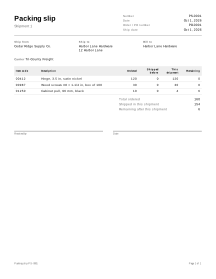
How to fill in a packing slip
- Parties. Enter the sender under Ship from and the delivery address under Ship to. Open Bill to only when the customer who ordered is not the person receiving the box.
- Order and shipment details. Type the customer’s Order / PO number and check the Ship date. Carrier and Tracking number are under More options and are printed as typed.
- Lines. For each item, enter the Item code, a description and the Ordered quantity. Shipped before starts at 0. Put what goes in this box under This shipment; Remaining is calculated. Tick More columns to show Unit if you ship in packs, cases or meters.
- Starting from a PO. If you keep the customer’s order as a purchase order in the editor (with your business as Supplier and the customer as Buyer), open it and choose Create packing slip instead of retyping the lines. Your business becomes Ship from, the customer Bill to, the order’s ship-to address Ship to, and the PO number Order / PO number. Prices, the logo and terms are not copied, and This shipment starts at the full ordered quantity. Long item lists can also be imported from a spreadsheet (CSV item import).
- Print or download. Print it or download the PDF. A Received by line and a Date line are printed for the recipient’s signature.
- The next box. When the rest of the order ships, choose Create next shipment.
Example: one order, two shipments
Names and figures are invented.
Cedar Ridge Supply Co. ships order PO-0001 to Harbor Lane Hardware. The hinges and screws are in stock; only 4 of the 10 cabinet pulls are.
Shipment 1
| Item code | Description | Ordered | Shipped before | This shipment | Remaining |
|---|---|---|---|---|---|
| 00412 | Hinge, 3.5 in, satin nickel | 120 | 0 | 120 | 0 |
| 00987 | Wood screws #8 × 1-1/4 in, box of 100 | 30 | 0 | 30 | 0 |
| 01250 | Cabinet pull, 96 mm, black | 10 | 0 | 4 | 6 |
Shipment 2, made with Create next shipment: last time’s This shipment is added to Shipped before, and This shipment is pre-filled with what is still open (6). Only three more pulls go out, so change it to 3.
| Item code | Description | Ordered | Shipped before | This shipment | Remaining |
|---|---|---|---|---|---|
| 01250 | Cabinet pull, 96 mm, black | 10 | 4 | 3 | 3 |
Remaining = Ordered − Shipped before − This shipment: 10 − 0 − 4 = 6 after the first box, 10 − 4 − 3 = 3 after the second. Lines that are complete (remaining 0) can be deleted from the second slip, as here, or left in to show that they are done.
Packing slips in practice
No prices
A packing slip has no price, discount or total columns at all, so you can put it in a box addressed to a gift recipient or a job site. Bill the order on a separate invoice.
Partial shipments and the remaining quantity
Make one packing slip per box or delivery with the same order number on each; Remaining is calculated, never typed. For an order that goes out over several shipments, with backorders and over-shipments, follow Partial shipments.
Packing slip, invoice, bill of lading, commercial invoice
- Packing slip: what is in this shipment, for the person who unpacks it. A delivery note is close to it and is often signed by the recipient.
- Export packing list: weights, package counts and dimensions for international shipping.
- Invoice: what the customer owes.
- Bill of lading: issued by or for the carrier as evidence that it received the goods.
- Commercial invoice: the document customs uses to assess the value of an export.
This tool makes the first one only; it has no weight or customs fields. For exports, see the common export documents listed by the US International Trade Administration, and ask your carrier what it needs. See all shipping documents.
Your data
Packing slips are never uploaded. Create next shipment needs the earlier slip, so save it on this device when the next box is days away (how saving works).
Limits
- It does not print shipping labels, buy postage or look up tracking numbers.
- It does not track stock or update inventory.