How to fill in a goods received note
- Start from the purchase order. Open the purchase order and choose Create goods received note. Each order line with an item code or description becomes a line with its Ordered quantity; the PO number and Supplier are copied. Blank order lines are left out.
- Delivery details. Type your own Note number, check Date received, enter who checked the goods under Received by, and the supplier’s delivery note or packing slip number under Delivery note no.
- Count what arrived. For each line, enter everything that came off the truck under Received now, including broken units. Then enter the broken units under Damaged and anything refused for another reason (wrong item, wrong size or color) under Rejected. Accepted and Outstanding are calculated. If a column is not shown, tick More columns above the lines in the editor.
- Notes. Use the Note column to say what was wrong with a line (“2 boxes crushed”, “sent gray instead of black”). For the delivery as a whole, open More options below Totals and type in Notes.
- Review. Each line shows a status: Complete, Short, Over or Pending (nothing received on this note). The discrepancy list sums up every short, over, damaged and rejected quantity.
- Print or download. Print it or download the PDF. Signature and Date lines are printed for the person who checked the goods.
- The next delivery. When the rest arrives, choose Create next goods received note.
Example: one order, two deliveries
Names and figures are invented.
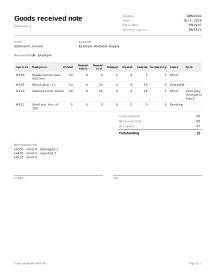
Saltmarsh Joinery ordered cabinet hardware on PO-0107 from its supplier. The first delivery arrives with a broken box, a wrong color and one item missing.
Delivery 1
| Item code | Description | Ordered | Received before | Received now | Damaged | Rejected | Accepted | Outstanding | Status |
|---|---|---|---|---|---|---|---|---|---|
| H-220 | Drawer runner pair, 450 mm | 10 | 0 | 6 | 1 | 0 | 5 | 5 | Short |
| H-305 | Wood glue, 1 L | 24 | 0 | 24 | 0 | 0 | 24 | 0 | Complete |
| H-410 | Cabinet knob, black | 20 | 0 | 20 | 0 | 2 | 18 | 2 | Short |
| H-512 | Shelf pin, box of 100 | 5 | 0 | 0 | 0 | 0 | 0 | 5 | Pending |
- Accepted = Received now − Damaged − Rejected: 6 − 1 − 0 = 5; 20 − 0 − 2 = 18.
- Outstanding = Ordered − Received before − Accepted: 10 − 0 − 5 = 5; 24 − 0 − 24 = 0; 20 − 0 − 18 = 2; 5 − 0 − 0 = 5.
- The discrepancy list shows: H-220 short 5 and damaged 1; H-410 short 2 and rejected 2; H-512 short 5.
Delivery 2, made with Create next goods received note: each line’s accepted quantity is added to Received before, and Received now is pre-filled with what is outstanding (0 for the glue). Everything arrives in good condition.
| Item code | Ordered | Received before | Received now | Damaged | Rejected | Accepted | Outstanding | Status |
|---|---|---|---|---|---|---|---|---|
| H-220 | 10 | 5 | 5 | 0 | 0 | 5 | 0 | Complete |
| H-305 | 24 | 24 | 0 | 0 | 0 | 0 | 0 | Complete |
| H-410 | 20 | 18 | 2 | 0 | 0 | 2 | 0 | Complete |
| H-512 | 5 | 0 | 5 | 0 | 0 | 5 | 0 | Complete |
10 − 5 − 5 = 0, 20 − 18 − 2 = 0 and 5 − 0 − 5 = 0: the order is complete. If only part of it had arrived, you would change Received now to what actually came.
Goods received notes in practice
Damaged and rejected units stay outstanding
A damaged or refused unit was delivered but not accepted, so it does not count against the order. In the example, 6 runner pairs arrived but only 5 were accepted, and 5 are still outstanding. That is what the supplier still owes you, whether they send a replacement or credit you for it. Damaged plus rejected can never be more than what arrived; Check before you send reports that as an error.
Short, over and pending
- Short: something arrived on this note, but the line still has an outstanding quantity.
- Pending: nothing arrived on this note for that line.
- Complete: the accepted quantities add up to exactly what was ordered.
- Over: more was accepted than was ordered. Check before you send warns you; it is often a counting or typing error. Otherwise, decide with the supplier whether you keep the extra units or send them back, and write it under Note.
Before you pay the supplier
Compare the supplier’s invoice with what was accepted, not with what was ordered. If the invoice charges for 10 runner pairs after the first delivery, the goods received note shows that only 5 were accepted. How you handle the difference is between you and the supplier.
Not a carrier claim
A goods received note is your own record of a delivery. It does not replace the carrier’s proof of delivery or a damage claim with the carrier, and claim deadlines differ by carrier and country. Note damage on the carrier’s paperwork too.
The other side of a delivery
The supplier’s side of the same delivery is the packing slip, and splitting an order over several deliveries works the same way as Partial shipments. See all purchasing documents.
Your data
Goods received notes are never uploaded; Create next goods received note and Received before rely on the earlier note being saved on this device (how saving works).
Limits
- It does not update stock levels or connect to an inventory or accounting system.
- It does not show prices or check the supplier’s invoice; compare them yourself.
- It does not collect electronic signatures; the signature lines are for a pen.